
Many students, researchers, and early-career professionals lose time and credibility because an email sound rushed, unclear, or unintentionally demanding. In academic and technical settings, email is often your first writing sample to a professor, supervisor, editor, collaborator, or client, so small grammar and tone choices carry disproportionate weight.
This article explains what makes an email professional, why grammar and tone matter, and how to revise your subject line, opening, request, and closing so your message is clear, respectful, and easy to act on. You will also see before and after examples you can reuse in real situations. Tools like the Trinka.ai free grammar checker can help you fine-tune your grammar and tone, ensuring your emails are professional and polished every time.
What professional means in an email and why it matters
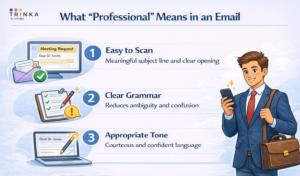
A professional email is not formal at all costs. It is purposeful, readable, and considerate of the recipient’s time. In university and workplace contexts, professional emails typically share three characteristics.
First, they are easy to scan. The recipient should understand your purpose within the subject line and the first one or two sentences. Purdue OWL’s email etiquette guidance emphasizes using a meaningful subject line and maintaining professionalism, which supports faster, clearer exchanges. https://owl.purdue.edu/owl/general_writing/academic_writing/email_etiquette.html
Second, they use grammar that reduces ambiguity. Misplaced modifiers, unclear pronouns, and inconsistent tense can make a request sound less credible or harder to answer, especially when you ask for approval, feedback, or an administrative action.
Third, they use a tone that matches the relationship and context. When you write to a journal editor, a PI, or a hiring manager, your tone should be courteous and confident, never casual, vague, or emotionally charged.
Start with the purpose, subject line, and first sentence
In most inboxes, the subject line determines whether your message gets opened quickly or buried. Purdue OWL recommends a meaningful subject line because it clarifies what the message is about and helps the recipient prioritize. https://owl.purdue.edu/owl/general_writing/academic_writing/email_etiquette.html
A useful subject line typically includes topic, context, and time sensitivity when needed. Keep it specific enough that the reader understands the request without opening the message.
Before (vague): Question
After (specific): BIO 402: Question about Methods section requirements (Lab report due Apr 2)
The first sentence should confirm who you are when needed and why you are writing, without a long backstory. This is important when emailing professors, supervisors, or administrative offices that handle many similar requests.
Before (slow start): I hope you are doing well. I am emailing because I have a question.
After (purpose first): I am in your BIO 402 section 03, and I am writing to confirm whether the Methods section should include reagent catalog numbers.
Use a greeting that matches the relationship
Professional greetings signal respect and help you avoid sounding abrupt. In academic contexts, use Dear Professor [Last Name] or Hello Dr. [Last Name] unless the person has invited a first-name basis.
A common tone problem is over-casual openers that resemble text messages.
Before (too casual): Hey, quick question…
After (professional): Hello Professor Nguyen,
If you are unsure about a title, choose the more respectful option and revise later when you confirm the preference.
Write the body for action, one request, one path to yes
Most professional emails fail because the reader cannot tell what you want them to do. Your body paragraph should make the action obvious and easy.
A reliable structure is:
- One-sentence context
- The request
- A short justification when needed
- A clear next step
This approach reduces follow-up questions and helps your recipient respond quickly.
Before (unclear request):
I am confused about the assignment, and I have been trying to work on it but I’m not sure if I did it right and I wanted to ask what you think.
After (clear action):
Could you confirm whether the Results section should include raw output tables or only summarized statistics? If you prefer summarized statistics, I will move the raw tables to the appendix.
Notice how the revision gives the recipient a simple choice and makes the next step explicit.
Grammar choices that affect professionalism
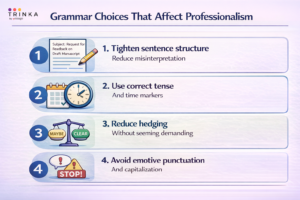
Professional tone is not only about politeness. Grammar influences whether your message sounds careful, competent, and fair. The issues below are common in academic and technical email because writers often draft quickly and send without revising.
1) Tighten sentence structure to reduce misinterpretation
Long sentences create avoidable ambiguity, especially when they contain multiple clauses and pronouns like this, it, they. Break one long sentence into two or three short ones when the request matters.
Before (hard to parse):
I submitted it yesterday and it still has not been graded which is why I am asking if you can check it because I think it might not have gone through.
After (clean and verifiable):
I submitted Assignment 2 on March 30 in the LMS. It still shows as “Not submitted” on my end. Could you confirm whether you received it?
2) Use correct tense and time markers
Email often combines past actions, current status, and future deadlines. If you mix tenses, the timeline becomes unclear.
Before (timeline confusion): I was sending the file, and I will upload it yesterday.
After (consistent timeline): I sent the file this morning and will upload it by 5:00 p.m. today.
3) Reduce hedging without sounding demanding
Non-native English speakers often hedge heavily to sound polite, for example maybe, perhaps, kind of, I guess. Excessive hedging can make you sound unsure or unprepared. Replace hedging with respectful, direct phrasing.
Before (over-hedged): I just wanted to maybe ask if it’s possible to perhaps extend the deadline?
After (direct and polite): Would it be possible to request a 48-hour extension due to a documented medical appointment?
4) Avoid emotionally loaded punctuation and capitalization
Multiple exclamation points, all caps, or dramatic phrasing can sound unprofessional even when you are not trying to be rude.
Before (emotionally intense): I NEED THIS FIXED ASAP!!!
After (urgent but professional): Please help resolve this today if possible. I need to submit the revised file by 4:00 p.m.
Tone control, polite, confident, and appropriately formal
Tone problems often happen when writers copy spoken language into email. In academic and technical environments, email should be closer to formal writing than conversation, but it should still feel natural.
Use polite requests instead of commands
Before (command): Send me the slides.
After (request): Please share the slides when convenient.
State constraints as facts, not pressure
If you have a deadline, state it clearly without implying blame.
Before (pressure): I need you to reply today.
After (transparent constraint): If possible, please reply by 2:00 p.m. today so I can finalize the submission.
Keep apologies specific and limited
One concise apology is often enough. Over-apologizing can distract from the purpose of the email.
Before (too much apologizing): Sorry to bother you, sorry for the email, sorry if this is annoying…
After (balanced): Thank you for your time. This clarification will help me revise correctly.
Three before and after email examples you can adapt
The examples below show how grammar and tone choices change clarity and professionalism in common academic and technical situations.
Example 1- requesting a meeting with a research supervisor
Before:
Subject: Meeting
Hey, are you free sometime this week to talk about my project?
After:
Subject: Meeting request: brief update on model evaluation results
Hello Dr. Chen,
Please schedule a 20-minute meeting this week to review the latest evaluation results and confirm the next experiment. I am available Tuesday 2:00 to 4:00 p.m. and Thursday 10:00 to 11:30 a.m., but I will adjust if another time works better.
Thank you,
[Your name]
Example 2 – following up without sounding accusatory
Before:
Subject: Follow up
I emailed you already and you didn’t reply. Please respond.
After:
Subject: Follow-up: approval needed for revised figure captions
Hello [Name],
I am following up on the revised figure captions I sent on March 29. If you have time, please confirm whether the edits are approved so I can finalize the submission this week.
Thank you,
[Your name]
A step-by-step revision process you can use in 5 minutes
Use this workflow when the email affects grades, timelines, approvals, or professional relationships:
- Rewrite the subject line so it includes context and the action or topic.
- Check the first sentence. It should state purpose immediately.
- Underline the request. If you cannot underline a single clear request, revise.
- Cut background that does not change the decision or action.
- Proofread for tone triggers, commands, blame language, excessive hedging, and emotional punctuation.
- Scan for grammar risks, long sentences, unclear pronouns, tense shifts, and missing articles, a, an, the.
- End with a clean closing that includes your name and relevant identifiers, course, lab, project.
Conclusion
Professional emails work when the recipient understands your purpose quickly, finds your request easily, and responds without guessing what you mean. To improve immediately, prioritize a meaningful subject line, a purpose-first opening, one clear request, and a closing that respects the reader’s time. Then proofread for the grammar issues that most often harm professionalism, long sentences, unclear pronouns, tense shifts, and emotionally loaded punctuation. Additionally, using the Trinka.ai free grammar checker can help you identify subtle grammar and tone issues, ensuring your message is both polished and clear before hitting send.

-
Go beyond grammar & spelling
Get holistic language improvements - Write with Trinka