

You proofread an important email and run a spell check before clicking Send. The document shows no spelling mistakes, but after reading it one last time, you notice sentences that sound awkward and a few grammar errors that make your writing less polished.
This happens because spelling is only one part of good writing. This article explains how spell checkers and grammar checkers work, where they differ, and which tool is better suited for different writing tasks.
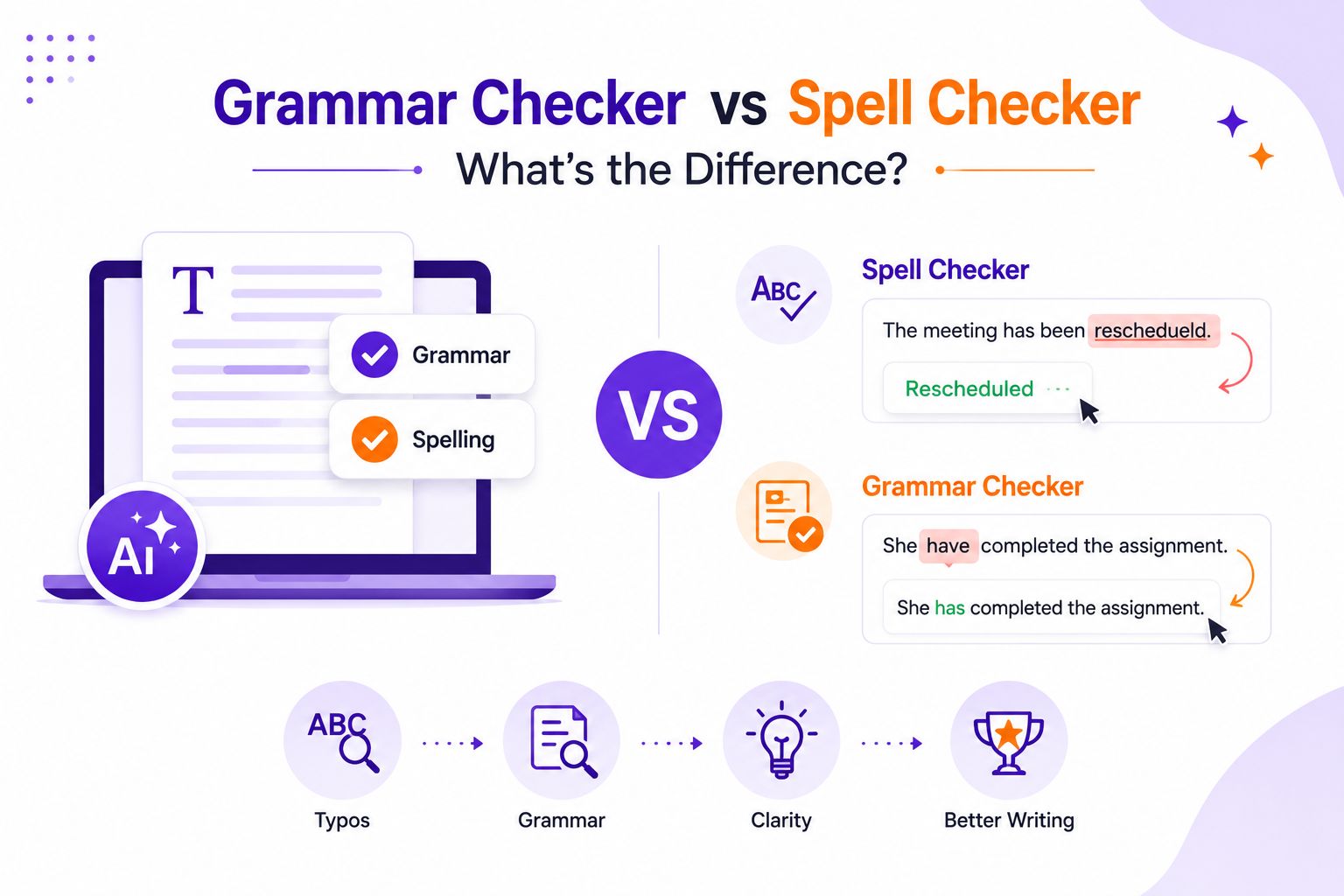
Grammar Checker vs Spell Checker: Quick Answer
A spell checker identifies misspelled words and suggests the correct spelling. A grammar checker includes spell checking but also reviews grammar, punctuation, sentence structure, word choice, and readability.
If your goal is simply to fix typing mistakes, a spell checker is enough. If you want writing that is clear, accurate, and professional, a grammar checker provides much broader support.
Grammar Checker vs Spell Checker at a Glance
| Feature | Spell Checker | Grammar Checker |
| Detects spelling mistakes | ✓ | ✓ |
| Corrects grammar | ✗ | ✓ |
| Reviews punctuation | Limited | ✓ |
| Detects incorrect word usage | Limited | ✓ |
| Suggests sentence improvements | ✗ | ✓ |
| Considers context | ✗ | ✓ |
| Improves readability | ✗ | ✓ |
| Best for | Fixing typos | Improving overall writing |
The key difference is simple. A spell checker reviews individual words. A grammar checker evaluates complete sentences and how those words work together.
How Do Spell Checkers and Grammar Checkers Work?
Although both tools review your writing, they analyze text differently. Understanding how they work makes it easier to know why one tool catches mistakes that the other misses.
How a Spell Checker Works
A spell checker compares every word in your document against a built in dictionary. If it finds a word that does not match an accepted spelling, it highlights the word and suggests possible corrections.
For example,
The meeting has been reschedueld.
The spell checker recognizes that reschedueld is not a valid word and recommends rescheduled.
This process is quick and effective for correcting typing mistakes. However, it has one important limitation. It only checks whether a word is spelled correctly. It does not understand what the sentence is trying to say.
Consider this example.
I left my laptop over their.
The word their is spelled correctly, so many basic spell checkers will not flag it. The correct word is there, but identifying that mistake requires understanding the context of the sentence.
How a Grammar Checker Works
A grammar checker reviews your writing at the sentence level instead of checking words individually. Modern grammar checkers use artificial intelligence and natural language processing to understand how words relate to one another within a sentence.
This allows the tool to identify grammar mistakes, punctuation errors, incorrect verb forms, repeated words, and awkward sentence structures. Many grammar checkers also recommend clearer wording and improve readability without changing the intended meaning.
For example,
She have completed the assignment.
Every word is spelled correctly, yet the sentence contains a grammar error.
A grammar checker recognizes that She requires has instead of have and suggests the correct sentence.
Many advanced grammar checkers also review writing style, consistency, and tone. These features are especially useful for academic papers, professional emails, reports, and website content where language quality matters.
If you regularly write for work or study, using a Grammar Checker while drafting can help you identify language issues before they become part of the final document.
What Spell Check Misses
One of the biggest misconceptions is that a document with no spelling mistakes is free from language errors.
In reality, many writing mistakes involve words that are spelled correctly but used incorrectly. Because spell checkers evaluate words individually, they often miss these errors.
The examples below highlight the difference.
| Sentence | Spell Checker | Grammar Checker |
| I went too the meeting. | ✓ | ✓ |
| Their presenting the report tomorrow. | ✗ | ✓ |
| The results was published yesterday. | ✗ | ✓ |
| She do not agree with the proposal. | ✗ | ✓ |
| This report are ready for submission. | ✗ | ✓ |
In the first sentence, both tools recognize that too should be to.
In the remaining examples, every word is spelled correctly. The problem lies in grammar or context rather than spelling. A grammar checker analyzes the sentence as a whole and can identify these errors accurately.
This is one of the biggest advantages of modern AI powered grammar checkers. They evaluate meaning rather than simply comparing words against a dictionary.
Why Grammar Checking Goes Beyond Spelling
Good writing is not only about using correctly spelled words. It is also about making ideas clear and easy to understand.
Compare these two sentences.
The manager say the proposal need more revisions.
A spell checker does not identify any mistakes because every word is spelled correctly.
A grammar checker recommends:
The manager says the proposal needs more revisions.
The second version is grammatically correct and easier to read. These improvements become even more valuable in longer documents where small language errors can affect credibility and readability.
For students, researchers, professionals, and content writers, grammar checking helps improve communication rather than simply correcting mistakes.
Grammar Checker vs Spell Checker: Key Differences
Although both tools improve writing, they are designed with different goals in mind.
A spell checker focuses on identifying spelling mistakes. It provides quick corrections for typographical errors but has limited understanding of grammar or sentence meaning.
A grammar checker performs a broader review. It identifies grammar mistakes, punctuation issues, incorrect word usage, sentence fragments, and readability concerns while suggesting improvements that make writing clearer.
The table below summarizes these differences.
| Feature | Spell Checker | Grammar Checker |
| Checks spelling | ✓ | ✓ |
| Checks grammar | ✗ | ✓ |
| Reviews punctuation | Limited | ✓ |
| Understands sentence context | ✗ | ✓ |
| Improves clarity | ✗ | ✓ |
| Suggests rewrites | ✗ | ✓ |
| Best suited for | Basic typo correction | Academic and professional writing |
When Should You Use a Spell Checker?
A spell checker is useful when your goal is to correct simple typing mistakes quickly. It works well for short pieces of writing where speed is more important than detailed language review.
- Text messages
- Quick emails
- Personal notes
- Shopping lists
- Draft outlines
Because a spell checker only reviews spelling, it should not be the only review step for documents that require polished writing.
When Should You Use a Grammar Checker?
A grammar checker is a better choice when you want your writing to be clear, accurate, and professional. Instead of checking individual words, it reviews complete sentences and suggests improvements that make your ideas easier to understand.
- Academic assignments
- Research papers
- Business emails
- Reports
- Blog posts
- Website content
- Cover letters
- Professional documentation
If a paragraph is grammatically correct but still difficult to read, using a Paraphrasing Tool alongside a Grammar Checker can improve sentence flow while preserving the original meaning.
Do You Need Both?
In most cases, no.
Modern grammar checkers already include spell checking as one of their core features. When you review a document with a grammar checker, spelling mistakes are identified alongside grammar, punctuation, and clarity issues.
A standalone spell checker is still useful if you only want to catch typing mistakes. However, for academic, business, or professional writing, a grammar checker provides a more complete review and removes the need for separate language tools.
Grammar Checker vs Spell Checker for Different Writing Needs
The right tool depends on the type of document you are writing.
| Writing Task | Spell Checker | Grammar Checker |
| Personal notes | ✓ | Optional |
| Emails | ✓ | ✓ |
| School assignments | Limited | ✓ |
| Research papers | Limited | ✓ |
| Business reports | Limited | ✓ |
| Website content | Limited | ✓ |
| Blog articles | Limited | ✓ |
For casual writing, correcting spelling mistakes may be enough. As the importance of the document increases, grammar checking becomes much more valuable because it improves both accuracy and readability.
Common Myths About Spell Checkers and Grammar Checkers
Myth 1: If spell check finds no errors, the document is ready.
Not necessarily. A document can contain grammar mistakes, punctuation errors, awkward phrasing, or incorrect word usage even when every word is spelled correctly.
Myth 2: Grammar checkers only fix grammar.
Modern AI grammar checkers also review spelling, punctuation, sentence structure, word choice, readability, consistency, and writing style.
Myth 3: Spell checkers and grammar checkers are the same.
A spell checker focuses on individual words. A grammar checker evaluates how those words work together to communicate your ideas clearly.
Which Tool Should You Choose?
| If you want to… | Best Choice |
| Correct typing mistakes | Spell Checker |
| Improve grammar | Grammar Checker |
| Improve sentence clarity | Grammar Checker |
| Improve readability | Grammar Checker |
| Write academic papers | Grammar Checker |
| Write professional emails | Grammar Checker |
| Create polished content | Grammar Checker |
For most writers, a grammar checker is the better long-term choice because it includes spell checking while offering much broader language support.
Final Verdict
Spell checkers and grammar checkers are designed for different purposes.
A spell checker helps you catch typing mistakes and misspelled words. A grammar checker builds on that foundation by reviewing grammar, punctuation, sentence structure, clarity, and word choice.
If you only need to correct a few spelling mistakes, a spell checker is sufficient. If you want writing that is polished, professional, and easy to understand, a grammar checker provides a more complete solution.
Understanding this difference helps you choose the right tool for each writing task and produce documents that communicate your ideas with greater confidence.

-
Go beyond grammar & spelling
Get holistic language improvements - Write with Trinka